FoxEyes - Change Eye Color
- 4.2
- Rating
- 5.00M
- Installs
- Free
- Price
 Analysis by App-foxy
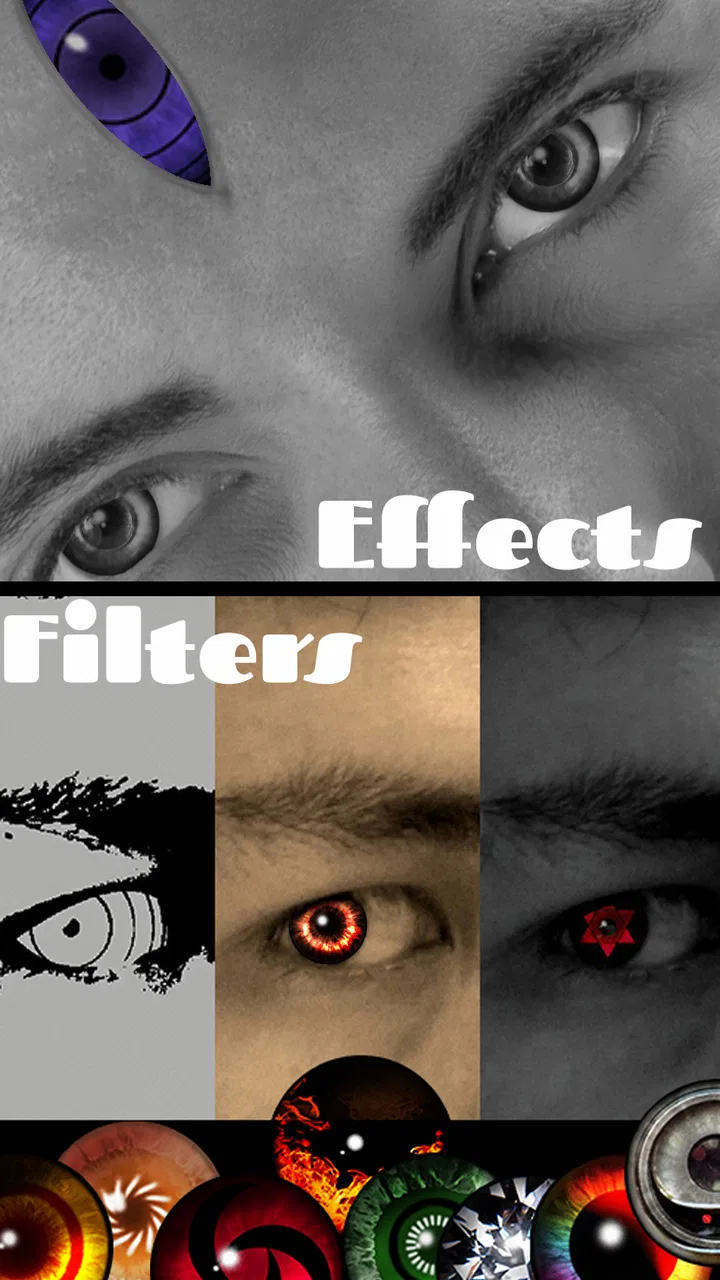
I tried FoxEyes - Change Eye Color as a lightweight beauty editor rather than expecting it to replace a full photo-editing suite. That distinction matters. This app is built around changing the appearance of eyes, using exotic-looking colors and effects to make an ordinary portrait feel more dramatic. If you enjoy experimenting with selfies, profile pictures, or playful social posts, it has a clear appeal. If you want detailed retouching, precise masking, or a complete camera workflow, you may quickly find its narrow focus limiting.
Developed by GameSmileStudio, it is a free Android beauty app with an Everyone age rating. The app has been available since March 23, 2016, and its current version is 2.9.2.1. With an average rating of 4.2 from around 24 thousand ratings and more than 5 million installs, it has clearly attracted a large audience. I think that popularity makes sense: changing eye color is easy to understand, visually immediate, and more entertaining than many ordinary filter apps.
What to consider before choosing an eye-color editor
The first question I would ask is what you actually want to change. FoxEyes is suited to a single visual idea: making the eyes stand out. That can mean trying an unusual color for a themed selfie, testing a fantasy look, or adding a striking detail to a portrait. It is not the best starting point if your priority is skin correction, background replacement, typography, collage design, or broad image manipulation.
You May Also Like

 AccuWeather: Weather Radar
AccuWeather Review: A Quick, Clear Forecast for Everyday Decisions
For everyday plans, the best forecast is the one you can understand quickly. AccuWeather makes rain timing, radar, and local conditions easy to act on, with a few trade-offs.

 Hill Climb Racing
Why Hill Climb Racing Still Turns Crashes Into One More Run
A tiny car, a bumpy hill and one more upgrade: Hill Climb Racing keeps resurfacing because its simple chaos makes every near-miss feel personal.

 AliExpress - Shopping App
AliExpress Makes Global Shopping Feel Personal, but Shoppers Bear the Risk
AliExpress turns a global marketplace into a pocket-sized discovery engine. Its reach is useful, its shopping loop compelling, and its trade-offs easy to miss.

 Lords Mobile: Kingdom Wars
Lords Mobile Is a Kingdom-Building Routine, Not a Quick Match
A case-by-case verdict on the building, battles, device demands, and social commitments that make Lords Mobile rewarding for some players and exhausting for others.

 PDF Scanner app - TapScanner
TapScanner Makes Paperwork Easier to Capture, Check, and Share
TapScanner makes scanning with a phone feel less like a rescue operation and more like a dependable step in getting work done. Its capture tools are useful, though not flawless.

 Block Blast!
 Shows How Much a Puzzle Game Can Leave Out
A quiet grid game shows why puzzle players increasingly value instant clarity, repeatable skill and low-pressure play—and where the genre still needs to catch up.
More From Our News Desk
View All News


I also paid attention to how much effort the result requires. A beauty app is useful when the effect can be applied without turning a quick edit into a project. For a casual user, the important test is not whether the app offers every possible tool; it is whether you can select a photo, explore eye styles, and reach a shareable result without needing editing experience. FoxEyes makes sense when speed and visual impact matter more than professional control.
There is another decision criterion that is easy to overlook: realism versus creativity. A subtle brown, blue, or green adjustment may look believable in a portrait, while a bright or exotic effect is better treated as a costume-like visual choice. I would not judge every result by the same standard. The app is more enjoyable when you decide in advance whether you want people to think “natural enhancement” or “deliberately unusual filter.”
How I approached a typical edit
My preferred workflow is to begin with a front-facing portrait where both eyes are visible and reasonably sharp. I then compare several effects before committing to one. This is more effective than choosing the first dramatic option, because a color that looks exciting in isolation can overpower the rest of the face. A neutral expression and even lighting also help reveal whether the eye effect follows the image convincingly.
For a profile image, I would keep the effect restrained and check the result at the size people will actually see. A highly detailed eye design can look impressive when zoomed in but become a bright spot when reduced to a small avatar. For a story post or creative portrait, I would be more willing to use an intense style. This simple distinction is one of the most useful ways to get better results without adding extra editing steps.
The strongest results come from matching the effect to the purpose of the photo, not from choosing the most dramatic option available. That is especially important with an app focused on one facial feature. When the eyes become the main visual event, the rest of the image needs to support them rather than compete with them.
Where FoxEyes wins in everyday use
The clearest strength is its focused concept. Many general photo editors bury eye adjustments among dozens of unrelated controls. Here, the central idea is immediately understandable: take a portrait and explore different eye appearances. That focus makes it approachable for someone who does not want to learn layers, brushes, curves, or advanced retouching terminology.
I can see myself using it before a themed event or a casual social post. Imagine taking a selfie during a slow commute, choosing a fantasy-inspired eye look, and saving a version that feels different from the usual portrait. The edit does not need to be permanent or realistic. The value is in creating a quick variation that gives an otherwise ordinary photo a new mood.
It also works well for visual experimentation. Someone considering colored contact lenses could use an edited portrait as a rough way to compare the feeling of different shades, although I would treat the result as inspiration rather than a reliable preview. Screen colors, lighting, the original eye color, and the chosen effect can all change how convincing the final image feels.
Useful habits for cleaner-looking results
One practical habit is to prepare the photo before opening the editor. Crop away distracting surroundings, avoid an angle where one eye is hidden, and choose an image with enough light around the face. This gives the eye effect a better starting point and reduces the temptation to blame the app for a difficult source image.
A second useful habit is to compare the edited portrait with the original before saving. Eye changes can be surprisingly easy to overdo because the feature is close to the center of the face. If the effect draws attention before the person’s expression does, I would try a softer choice or a different image. The best edit often feels noticeable only after someone looks twice.
A third tip is to keep separate versions for different audiences. I would use a restrained result for a professional-looking profile and reserve the more exotic styles for friends, creative posts, or entertainment. That avoids the common mistake of expecting one eye effect to suit every context.
The app’s free price is another meaningful advantage. It lowers the risk of trying a specialized editor that you may use only occasionally. You do not have to commit to a subscription simply to discover whether this style of editing appeals to you. For a quick experiment, that makes the decision easy.
The age rating of Everyone also makes the concept broadly approachable. That does not mean every edited image will suit every audience, but the basic activity is simple beauty-focused image customization rather than a complicated specialist tool. I would still encourage younger users to think carefully before sharing personal photos publicly, especially when an effect makes an image feel more revealing or attention-grabbing.
What the audience response suggests
The app’s average rating of 4.2 indicates generally positive reception without suggesting that every user has had a perfect experience. I read that as a realistic sign of a fun, useful niche tool rather than proof of professional-level editing. Its more than 5 million installs show that the idea has broad reach, but popularity does not change the app’s basic trade-off: it concentrates on eye effects instead of trying to solve every beauty-editing need.
That distinction helps set expectations. If you download it for quick color experiments, the focused design is a benefit. If you expect a complete portrait studio, the same focus may feel restrictive. I would recommend judging it by the first use case, not by comparing it with apps designed for entirely different jobs.
Where broader alternatives may fit better
FoxEyes is not automatically the best choice for every portrait. A full beauty editor is usually a better fit when you want to combine eye changes with skin smoothing, face shaping, makeup adjustments, lighting corrections, and blemish removal in one session. A general photo editor may be preferable when you need text, frames, selective color work, or control over the whole composition.
There is also a difference between a playful effect library and a natural retouching tool. If your goal is to make the eyes look as though they were photographed with a different natural color, a more advanced editor with careful masking and opacity controls may give you greater control. I would choose that route for a polished portrait where small inaccuracies matter. FoxEyes is more convincing as a creative shortcut than as a precision instrument.
Dedicated social-camera apps can be more convenient when you want to preview effects live while taking a picture. Their advantage is immediacy: you can adjust your expression and framing while seeing the result. FoxEyes makes more sense when you already have a photo and want to transform it afterward. The choice depends on whether your process begins with shooting or editing.
Cloud-based editing services may also appeal to users who work across several devices or need a larger collection of general tools. On the other hand, a narrowly focused app can feel less intimidating and require less time to explore. Since FoxEyes is free, I would try it first for eye-focused experiments rather than switching immediately to a more complex alternative.
Limitations I would keep in mind
The specialization that makes the app easy to understand can also become its main limitation. Once you have created a few eye-color variations, you may want more control over the surrounding image. If the portrait needs lighting correction, background cleanup, or detailed facial retouching, you will likely need another editor afterward. That extra step is manageable for occasional use but inconvenient for a regular content workflow.
Results will also depend heavily on the source photo. A partially covered eye, strong shadow, unusual angle, or low-detail image can make any eye overlay look less natural. I would not use a difficult group photo as my first test. Starting with a clear portrait gives you a fairer impression of what the app can do.
Another limitation is creative consistency. A highly unusual eye effect may look excellent in one image and awkward in another because the face, lighting, and mood change. I would not expect one favorite style to work universally. Saving a few different approaches for different portraits is more realistic than searching for one permanent signature look.
The real cost of switching between editors
Because FoxEyes is free, the main cost of trying it is not financial. It is time, attention, and the effort of moving images between tools when the first app does not cover everything. For a person who edits one selfie now and then, that cost is tiny. For someone preparing many portraits, repeated exporting and re-editing can become frustrating.
I would use FoxEyes as the first stage when the eye effect is the creative starting point. After that, I would move the result to a broader editor only if the image needs additional work. This order is more efficient than opening a complex editor first and searching through unrelated tools for an eye option. It also helps preserve the original photo, since I can compare the focused edit with later adjustments.
If you are replacing a general beauty app, the switch may feel like a trade rather than an upgrade. You gain a simpler path to unusual eye designs but lose the convenience of having many beauty controls in one place. If you are replacing manual editing, the trade is more favorable: you give up some fine control in exchange for a faster experiment.
For people who care about a consistent personal style, I suggest deciding on a small set of situations before switching fully. Try a natural-looking portrait, a playful selfie, and a dramatic themed image. If the app handles the type of photos you actually create, it has earned a place in your routine. If every result needs heavy correction elsewhere, a broader alternative will probably save time.
Who should use it and who should skip it
I would recommend FoxEyes to casual selfie makers, creative users, people preparing themed images, and anyone curious about how different eye colors might change a portrait. It is particularly appealing when the desired result is immediate and visual rather than technically perfect. The free price makes it easy to test without treating the download as a major commitment.
I would skip it as a primary editor if you regularly produce polished portraits, need detailed control over edges and opacity, or want a single app for complete beauty work. Professional photographers, social-media managers handling batches of images, and users who need reliable consistency across many photos may prefer a more comprehensive tool. That is not a criticism of the concept; it is simply a mismatch between a focused effect app and a demanding workflow.
I would also avoid using it as a medical or optical preview. An edited image can suggest a style, but it should not be treated as an accurate representation of contact lenses or a change in natural eye appearance. For that kind of decision, real-world advice and a proper fitting process matter more than a visual filter.
My recommendation after using the app
FoxEyes - Change Eye Color is worth trying if you want a quick way to give portraits an unusual focal point. GameSmileStudio has kept the idea straightforward, and the large audience around the app reflects how accessible that idea is. I enjoy it most when I approach it as a creative effect tool rather than a complete beauty studio.
My recommendation is strongest for occasional edits: choose a clear portrait, test several styles, compare the result at the size where it will be shared, and keep the original beside the finished version. Those small steps make the experience more satisfying and help prevent an artificial-looking result. If you need more than eye-focused changes, use this app as one step in a broader workflow instead of expecting it to do everything.
With a 4.2 average and a free entry point, it is an easy experiment for Android users on version 5.0 or later. I would download it for playful portraits, fantasy looks, and quick visual comparisons. I would choose a broader alternative for serious retouching or a multi-tool editing routine. In short, FoxEyes is a good specialist app when the eyes are the idea; it is not the right choice when they are only one small part of a much larger edit.
FAQs for FoxEyes - Change Eye Color
01What features does FoxEyes - Change Eye Color offer?
FoxEyes provides a variety of features, including a wide range of realistic eye color options, the ability to adjust brightness and contrast, and tools to refine the placement of the virtual lenses. Additionally, it offers filters and effects to enhance the overall look of your photos, making it a comprehensive tool for eye color editing.
02Is FoxEyes - Change Eye Color easy to use for beginners?
Yes, FoxEyes is designed with user-friendliness in mind. The interface is intuitive, and the app provides step-by-step guidance for new users. With simple controls and clear instructions, even those with no prior experience in photo editing can easily navigate through the features to achieve their desired look.
03Are there any in-app purchases in FoxEyes - Change Eye Color?
FoxEyes is free to download, but it does offer in-app purchases. These purchases can unlock additional eye color options, advanced editing tools, and remove ads for an uninterrupted experience. However, the free version provides sufficient features for basic use, making in-app purchases optional.
04Does FoxEyes - Change Eye Color support all eye shapes and sizes?
FoxEyes is designed to accommodate various eye shapes and sizes. The app includes tools to adjust and fit the lenses precisely to your eyes, ensuring a natural and seamless look. Users can manually adjust the size and position of the virtual lenses to achieve the best results for their specific eye shape.
05Is FoxEyes - Change Eye Color safe to use regarding privacy?
FoxEyes takes user privacy seriously. The app requires access to your photos to function but does not store or share your personal data without consent. It's always advisable to review the app's privacy policy to understand how your data is handled and ensure you are comfortable with the terms.
Pros
- Wide variety of eye colors to choose from.
- Realistic effects enhance natural look.
- User-friendly interface for easy use.
- Fast processing with quick results.
- Supports high-resolution images.
Cons
- Limited free features; in-app purchases needed.
- Occasional ads disrupt editing flow.
- Requires internet for certain features.
- May crash on older devices occasionally.
- Some colors appear unrealistic in low light.

FoxEyes - Change Eye Color
Gallery